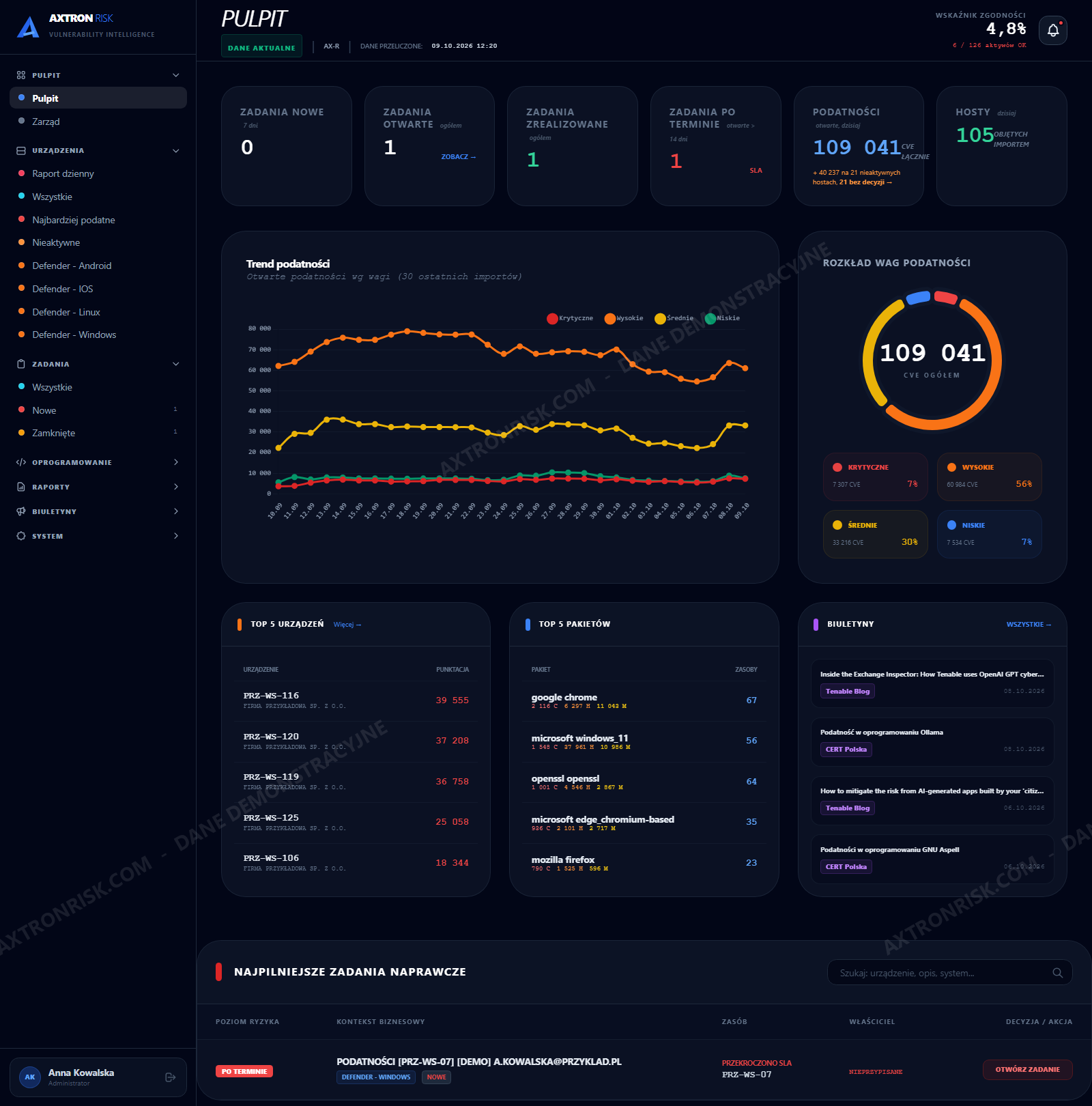
The Defender dashboard tells you how you are doing.
Not what to do next.
A Secure Score is a grade. „107 devices discovered, 75 active” is a statistic. An incident marked Informational is noise. None of those numbers ends in an action - the conclusion is left to a person who already has other things to do today.
Microsoft Defender Threat & Vulnerability Management hands you a raw CVE stream - with no history, no owner, and no record of whether anything was fixed. Hence the four questions you have to answer yourself, and that your board, your auditor and your regulator will ask:
- Since when has this vulnerability been open here?
- Whose device is it and who is accountable for it?
- Who handled it and when was the work accepted?
- Is it actually gone, or did somebody just say so?
The same Defender.
Four things it is missing.
Axtron Risk scans nothing on its own - Defender does that. It adds the layer where a scan result becomes something you can work with and defend in an audit.
The time dimension
What was visible on which day and exactly when it disappeared. Per-device scan history, not just the state right now.
Accountability
Who raised the task, what exactly was ordered that day, and who accepted the work. The date and the person are recorded, not just a flag.
Context Defender does not have
The CISA KEV catalogue separates a vulnerability that merely has an exploit from one that is actually being used in attacks today. EPSS (the FIRST model) adds the probability of exploitation within 30 days - so you can see what to patch before it lands in KEV. RSS advisories add, next to every CVE number, how many of your devices still have it open.
Audit-ready material
A monthly report with methodology and caveats, ready to print. The answer to the auditor's question before it is asked.
It is not about your industry.
It is about your situation.
Axtron Risk was born in the financial sector, because that is where the demands on evidence are harshest. But the problem it solves belongs to anyone who has to account for vulnerabilities to somebody on the outside.
From dozens to a few hundred devices
Too many to keep under control in a spreadsheet. Too few to justify your own SOC and a dedicated vulnerability management role.
Microsoft 365 is already in place
Defender for Business from Microsoft 365 Business Premium is entirely enough - so is Defender for Endpoint plan 1 or 2. No scanner to buy, no extra agent to roll out.
Somebody asks you for evidence
An ISO 27001 auditor, a NIS2 inspection, a cyber insurer, a corporate client's security questionnaire or your own board. Each of them wants dates and names, not a screenshot of a portal.
Financial sector - a special case
Banks and financial institutions additionally get material aligned with DORA and KNF Recommendation D. That is where this system comes from, but nothing in it assumes banking.
A group of companies, or an IT provider with clients
One installation serves many entities with separated access. A managed service provider can run several clients on it as a service.
No security team of your own
The system leads you by the hand: the daily report says what to deal with today, and the diagnostics say when not to trust the numbers.
Three things that
cannot be clicked into existence
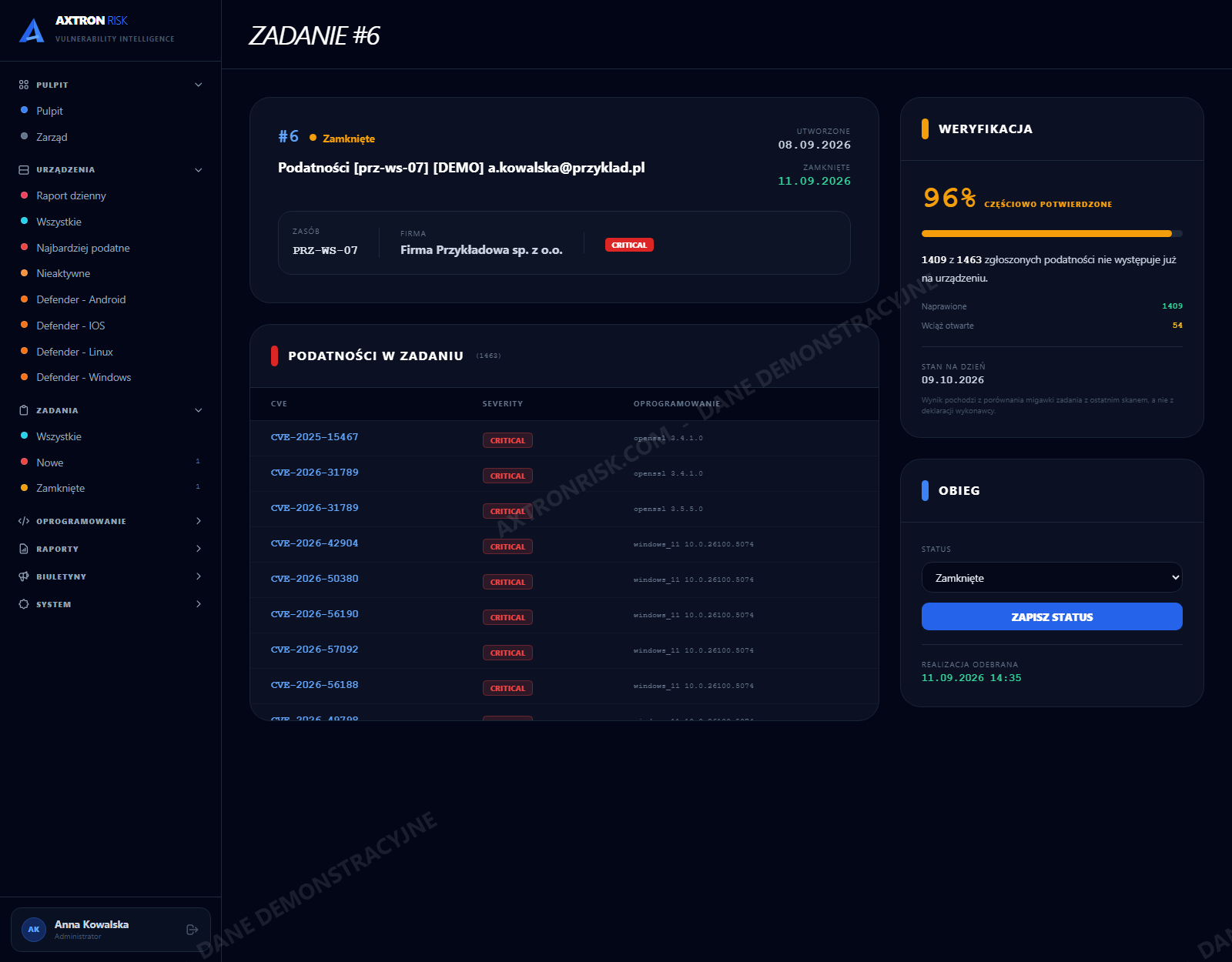
95%. Not from a statement. From the next scan.
The moment a remediation task is raised, the system stores a snapshot - the exact list of that device's vulnerabilities on that day. The snapshot never changes, even as later scans change the device.
Every subsequent Defender import compares the snapshot against the current state and shows how many of the reported items are genuinely gone. For an auditor, that is the difference between a contractor's declaration and evidence from measurement.
confirmed by a later scan
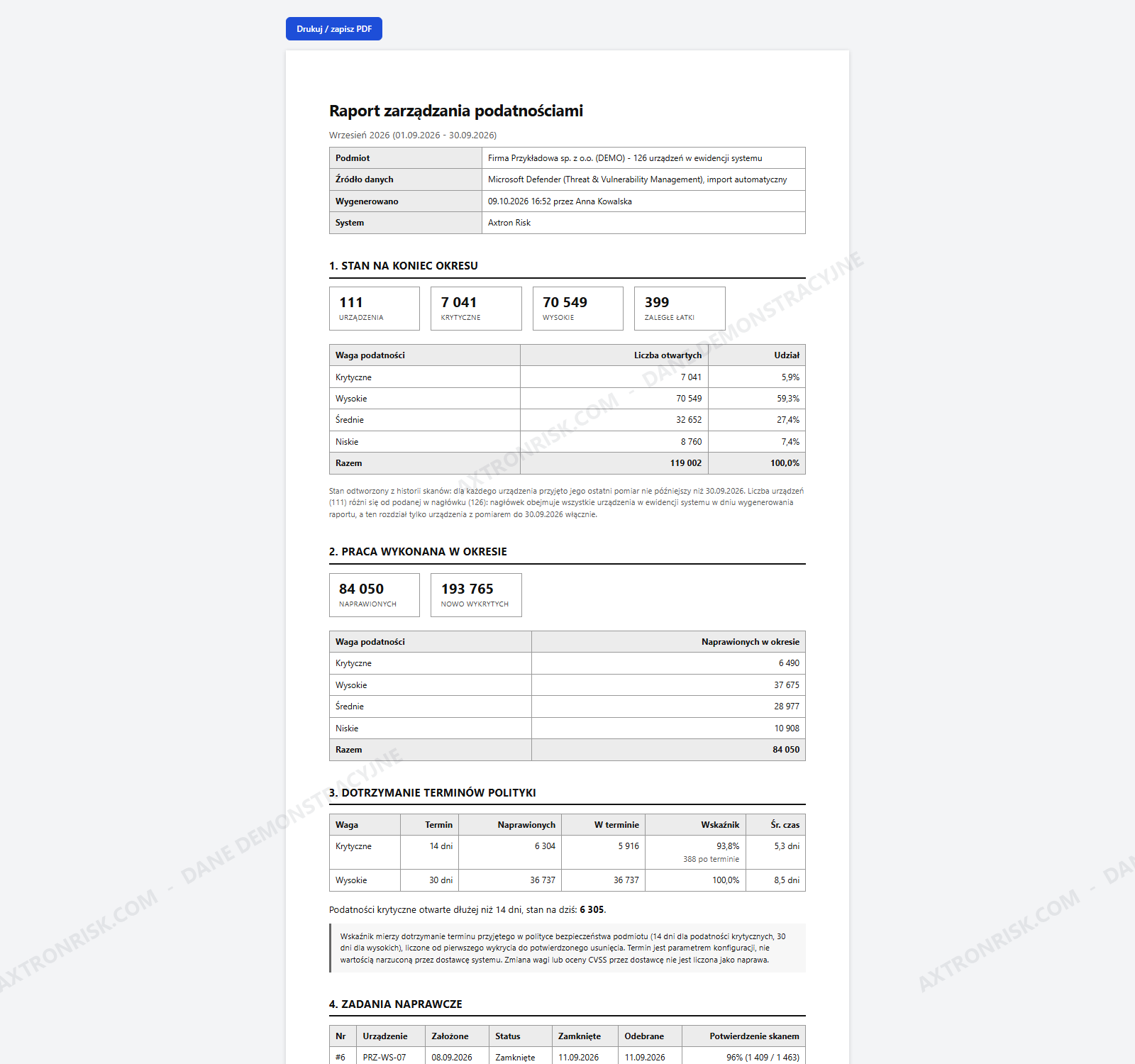
A report that admits its own gaps
Six chapters: state at period end, work completed in the period, adherence to policy deadlines, remediation tasks with scan confirmation, overdue updates, and methodology with caveats. Print or save to PDF straight from the browser, with space for the preparer's and approver's signatures.
The policy deadline - 14 days for critical and 30 for high by default - is an installation setting, not a value imposed by the vendor. The system measures adherence to your deadline, the one written in your own policy.
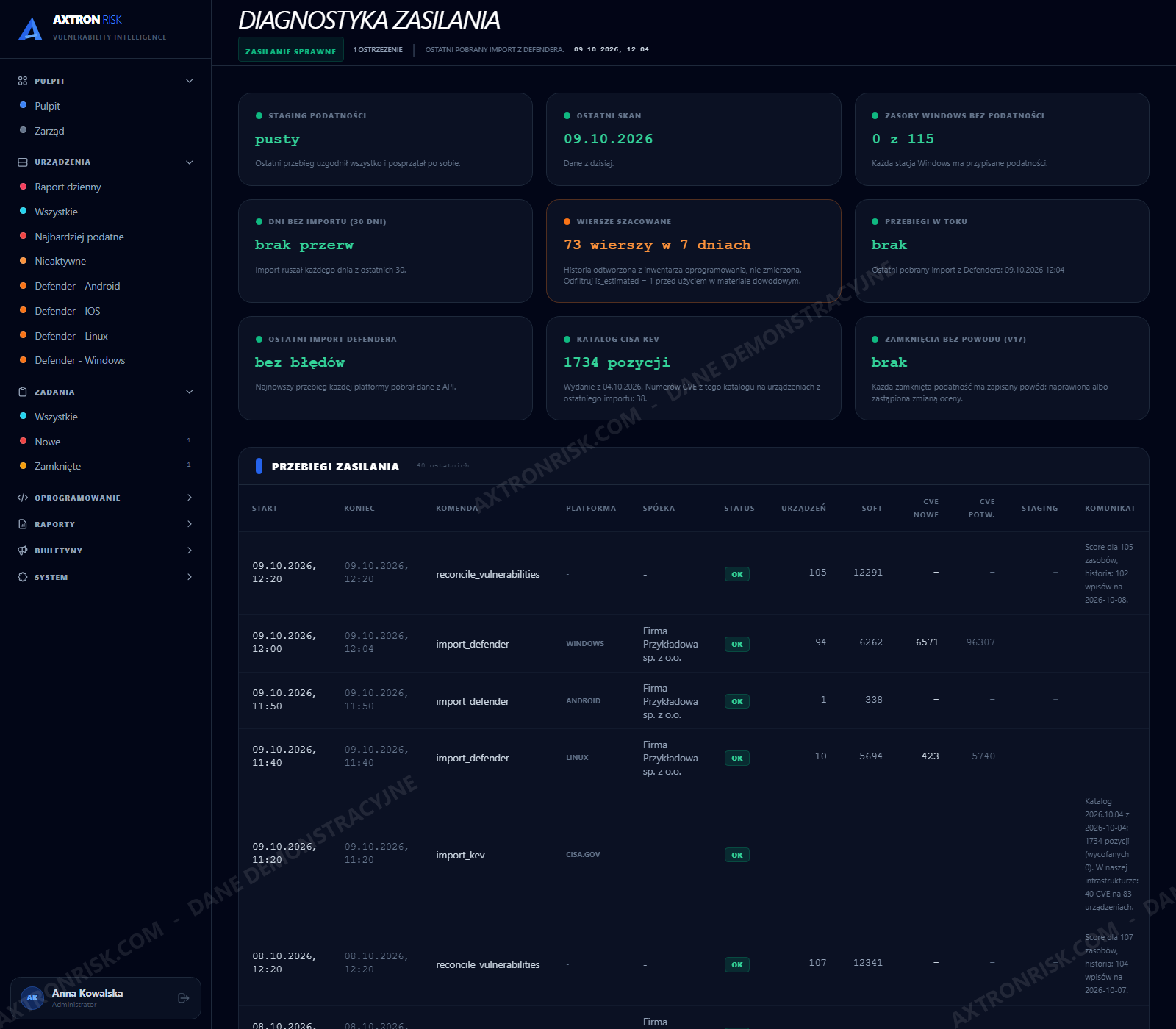
Before you ask whether these numbers are real
Six checks, each with an explicit criterion: whether the last run finished writing, whether the data is older than two days, whether any Windows workstation reports zero vulnerabilities (which usually means a failed write rather than a secure machine), which days had no import, which rows are estimated rather than measured, and whether any run is hanging.
A red dot next to the menu lights up on every screen the moment the data pipeline breaks.
The screens people
actually work on
Every screenshot comes from a running on-premise installation fed with Microsoft Defender data, not from a mockup. Company, device and people names are anonymised.
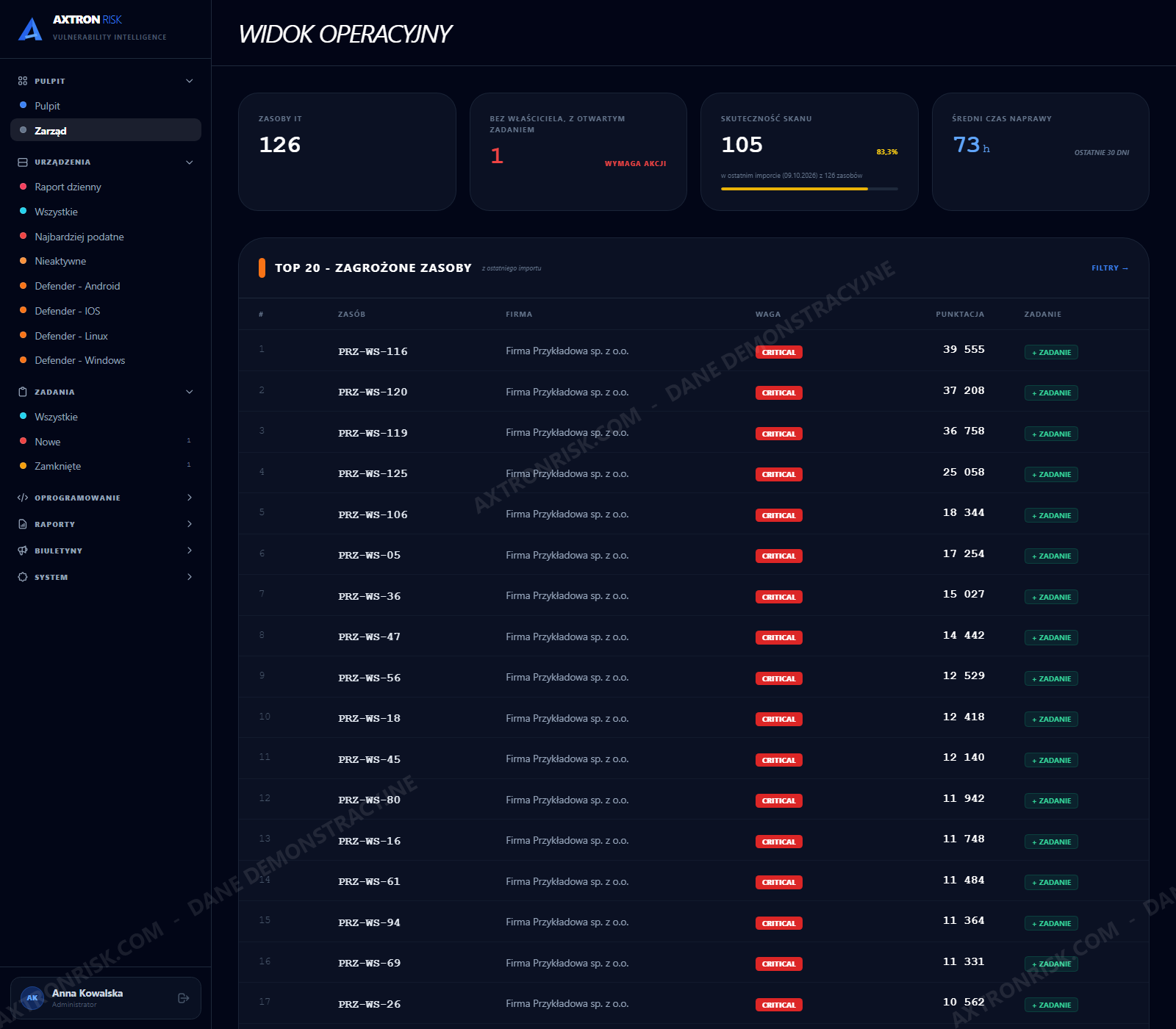
Board view
A simplified screen for management: IT assets, open risk decisions, scan coverage, average time to remediate over 30 days.
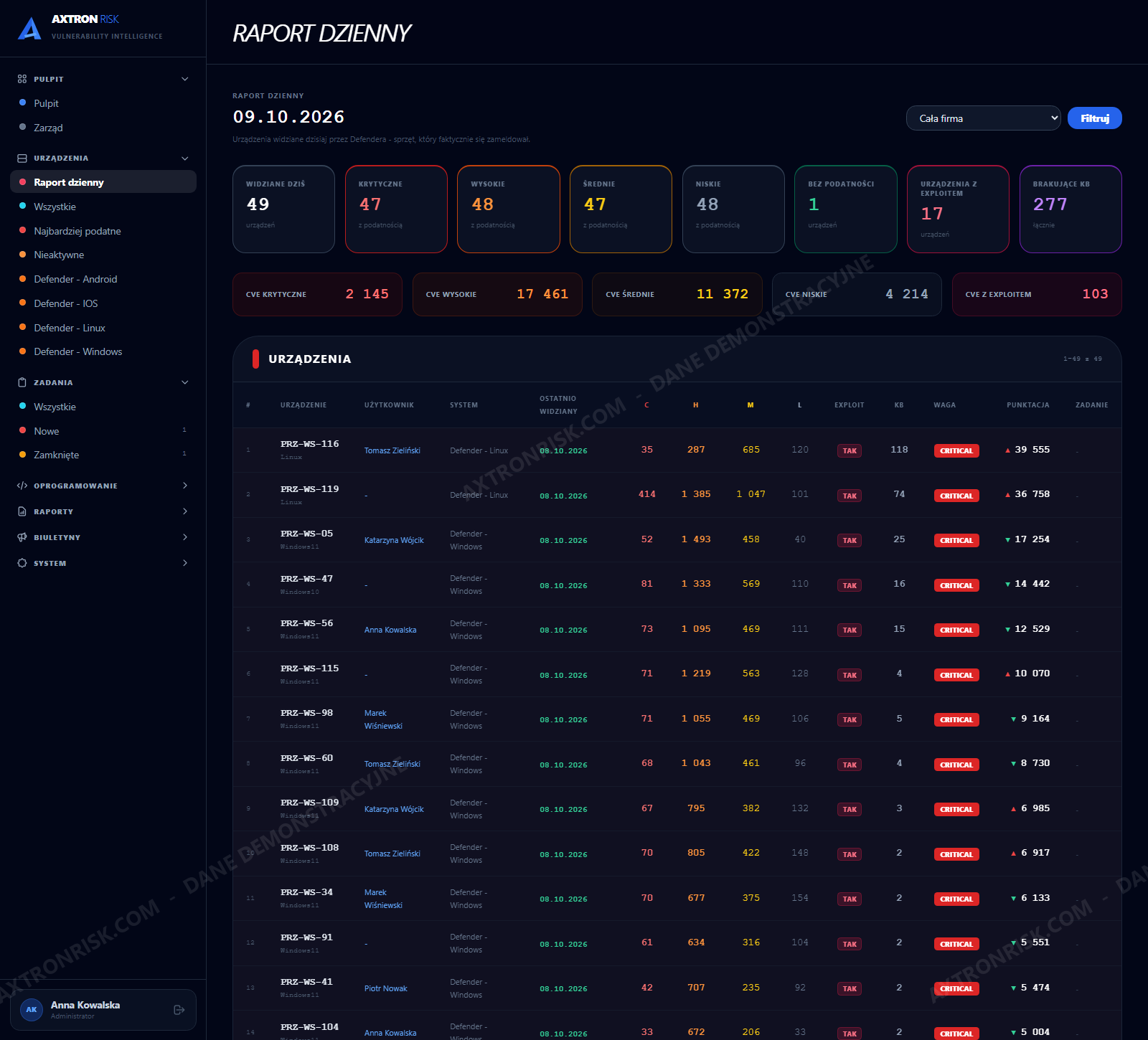
Daily report
Devices sorted by actual risk score, not alphabetically. The starting point for the working day.
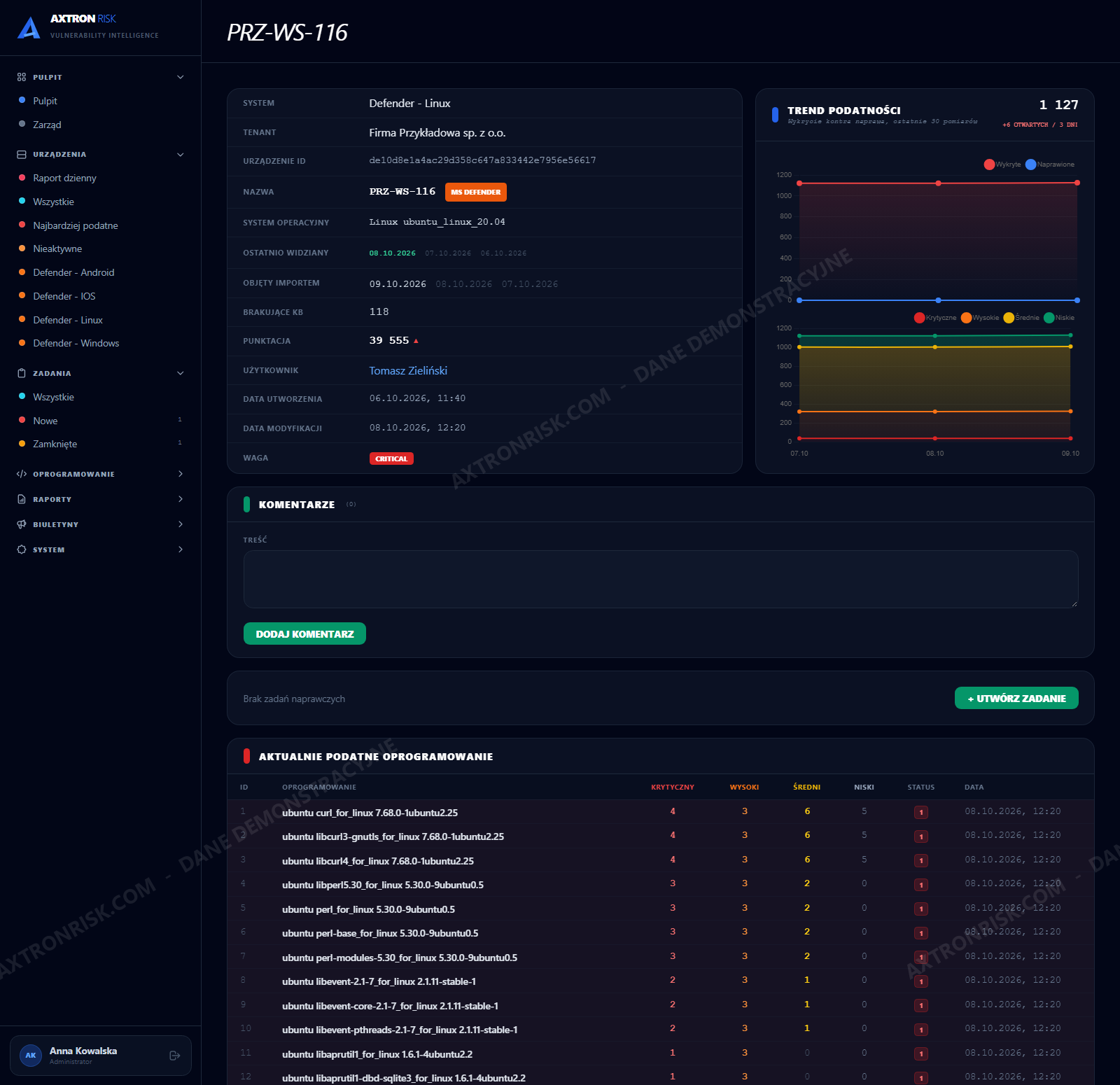
Device record
Properties, vulnerabilities, installed software, tasks, notes and a 30-day trend in one place.
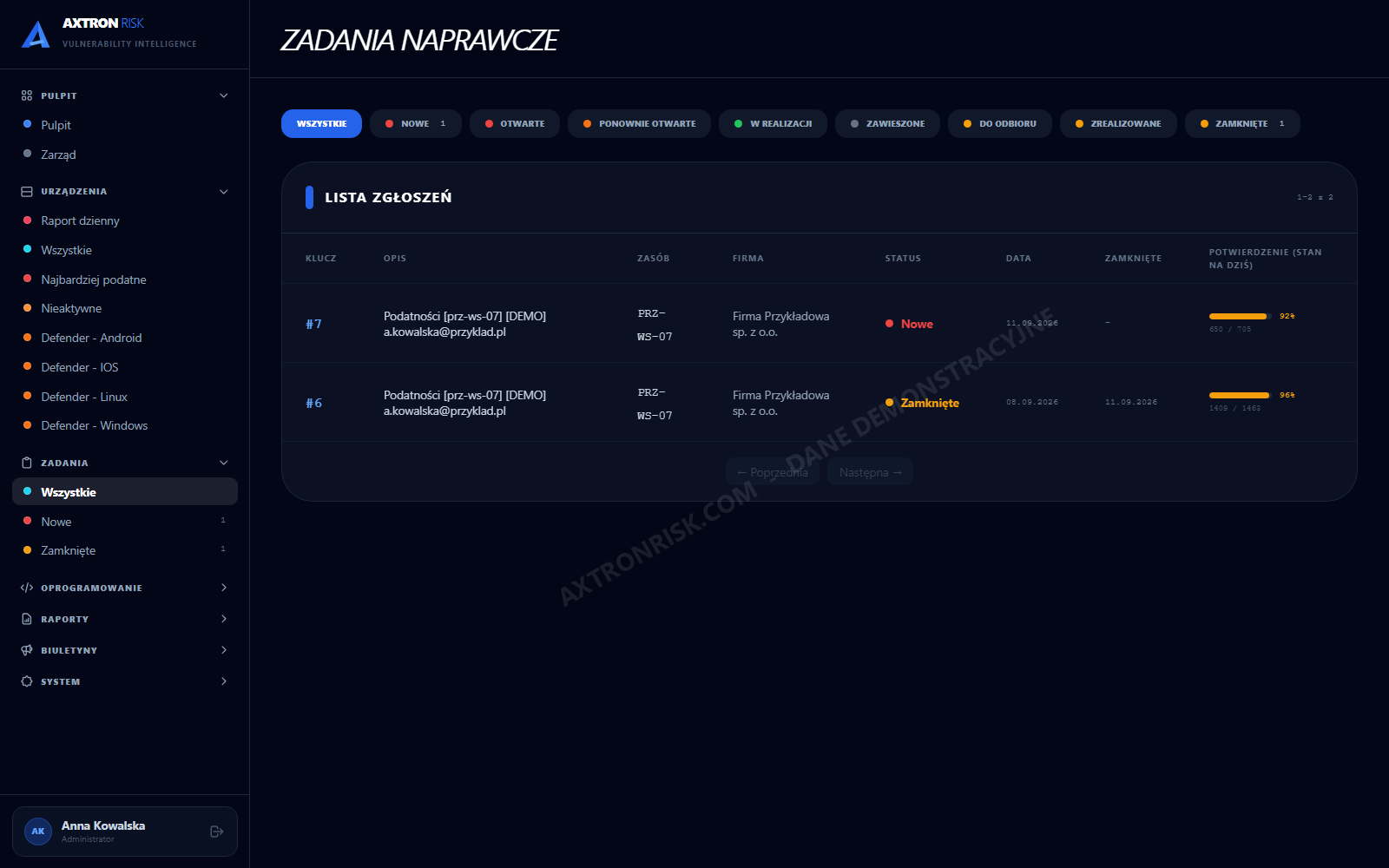
Remediation tasks
The full remediation loop inside Axtron, with a scan-confirmation column. JIRA is an option, not a requirement.
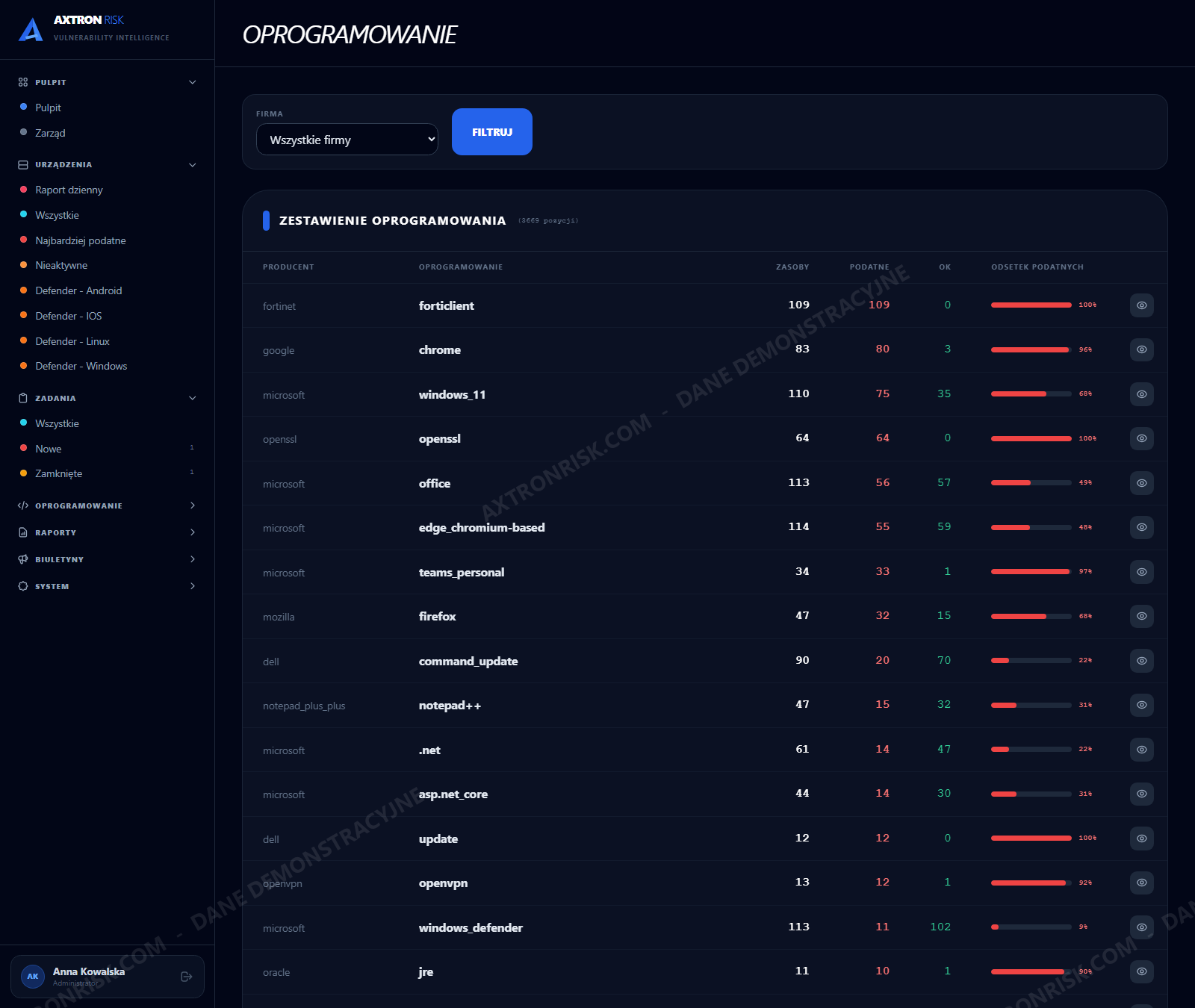
Software inventory
Packages with the number of vulnerable devices - the scale of one update without walking the estate.
Access and roles
Three roles: Read-only for the board and auditors, Analyst, Administrator. Accounts can be scoped to selected entities.
Audit material,
not a compliance claim
Concrete artefacts the system produces on its own and that you can put on the table - whichever standard happens to apply to you.
ISO 27001, control A.8.8
Management of technical vulnerabilities: a documented process of detection, assessment and remediation, with dates and names. The auditor gets history, not assurance.
NIS2
For essential and important entities: vulnerability handling as part of risk management, with evidence that the process actually runs rather than existing on paper.
DORA and KNF Recommendation D
For the financial sector: continuous identification of vulnerabilities, accountability for IT activity and reporting at board level.
GDPR, article 32
Regular testing and evaluation of technical measures. The system shows that this testing has a date, a scope and a result.
Evidence instead of assertion
Confirmation of a fix comes from the next measurement, not from the contractor's declaration. The task snapshot cannot be rewritten after the fact.
Data completeness in plain sight
The report states how many days of the period were actually measured. Your auditor gets that information from you, before finding it themselves.
What Axtron Risk does not do
This is not a GRC platform. It does not maintain an enterprise risk register, does not map the full ISO 27001 control set and will not replace control questionnaires. It delivers evidence in one area - technical vulnerability management - and does it thoroughly enough to survive an audit. If you are looking for full GRC, you will hear that on the first call, not on the third.
On-premise.
One data source is enough to start.
Defender as the only source
Defender for Business from Microsoft 365 Business Premium, or Defender for Endpoint plan 1 or 2 - any of them is enough, because the system builds on the vulnerability layer they all share. No additional licences to get started. If you run Tenable or Qualys, an integration with them can be added as a separate module.
Installed on your side, not in a vendor cloud
Vulnerability data never leaves your network. No data entrusted to a third party and no cloud outsourcing notification.
A complete remediation loop without JIRA
Tasks are raised and closed inside Axtron, with statuses and formal acceptance. JIRA is an option for those who already run it, not a condition of using the system.
One installation for many entities
Multi-tenant with per-entity access separation - for a corporate group, an association, or an IT provider running several clients as a managed service.
From first call to first report
30 minutes on a running system with demonstration data. No access to your environment and no commitment - at this stage you are only judging whether it solves your problem.
If you want to see your own data: your administrator creates an app registration on their side, with read-only permission to vulnerability data, and revokes it whenever they like. No agent on workstations, no changes to your Defender configuration.
The first full import and the first report on your own data. From that day the history begins to build - the history the Defender portal does not keep.
A scheduled daily import, a monthly report at period end, and pipeline diagnostics available at any moment.
Licensing model
An annual licence for the on-premise installation, with no charge per scan and no charge per vulnerability found. Pricing depends on the number of devices and the number of entities in the installation - and you get the figure on the first call, not after three meetings.
The question you will ask anyway
You are buying on-premise software from a small vendor, so somebody on your side will ask what happens if the vendor disappears. In the financial sector DORA requires that assessment outright; everywhere else it is simply prudent. Here is the answer before the question lands.
The installation runs without us
The system sits on your server and does not depend on vendor infrastructure. Our unavailability stops neither the imports nor the reports.
The data is yours and portable
The database runs on your side, on a standard engine. Export the data at any time, without asking the vendor for permission.
Source code escrow
Code escrow can be written into the contract if your risk function requires it.
Documentation ships with the system
The user manual and technical documentation are part of the delivery, not a paid extra.
Before we book a call
We are not a bank. Is this tool for us?
Yes. It was built against financial-sector requirements because those are the harshest, but nothing in it assumes banking. If you run Defender and have somebody you need to show that vulnerabilities are being managed - an auditor, an insurer, a client or your own board - you are in the target group.
Do we need JIRA?
No. A remediation task is raised and closed inside Axtron, with statuses, formal acceptance and scan confirmation. JIRA is an option for those who already run it.
How do you know which vulnerability is genuinely dangerous rather than merely high-scoring?
From three sources outside Defender. The CISA KEV catalogue collects vulnerabilities with confirmed use in real attacks - a different fact from „an exploit exists”, which is what Defender gives you. EPSS (the FIRST model, updated daily) gives the probability that a vulnerability will be exploited within 30 days: KEV tells you what is already happening, EPSS what is most likely to happen next. Together they set the patching order: KEV first, then high EPSS, and only then severity and volume. The third source is an RSS advisory feed whose addresses you enter yourself: next to every CVE number in an advisory you see straight away how many of your devices still have it open. A server with no internet access loads KEV and EPSS from a file - that mode exists precisely for an installation cut off from the network.
We only have Defender for Business from Microsoft 365 Business Premium. Will it work?
Yes - and that is exactly the configuration the system was built and tested against. Defender for Business exposes the vulnerability layer alone, so that is deliberately all we rely on. Richer plans (Defender for Endpoint 1 and 2) add more device detail, but nothing the system needs in order to work. The assigned user is resolved from the exposure graph, so you get that in the basic configuration too - and where the graph points to nobody, the field stays empty rather than guessed.
Do we need Intune for this?
Axtron does not require it. The only condition is that your devices are visible in Defender - how you onboard them (local script, group policy, Intune) is up to you. If you do run Intune, the system compares its device list with Defender: it takes the device owner from there, shows machines that are enrolled in Intune but send no data to Defender, and does not double-count computers renamed at enrolment. Without Intune the import works the same and the owner is resolved from the exposure graph. In Microsoft 365 Business Premium Intune comes with the same licence, and for Android and iOS phones it is usually the only way they reach Defender at all.
Does anything need to be installed on workstations?
No. Data is pulled from the Microsoft API using an app registration with read permission. No additional agent appears on any workstation.
Does our data leave the organisation?
No. The installation runs on your server, and so does the database. The server only downloads and never sends anything out: your own data from the Microsoft API (Defender and, if you run it, Intune), the CISA KEV catalogue, daily EPSS scores (FIRST), the DB-IP IP-location database and the RSS feeds whose addresses you enter yourself. KEV, EPSS and DB-IP can be loaded from a file, in which case the server needs nothing but its connection to Microsoft.
We run IT for several clients. Can they share one installation?
Yes. The system is multi-entity: an account scoped to one client sees only that client's devices, tasks and reports, including the dashboard totals. The monthly report is produced separately for each entity.
What does the board see, and what does an administrator see?
The Read-only role can view every screen and change nothing - it is intended for the board and auditors. An Analyst raises tasks and accepts completed work. An Administrator also manages accounts.
What if there has been no scan since the fix was reported?
The system shows a warning instead of a result. A missing confirmation caused by a missing measurement is not the same as work not done, and the report keeps the two apart.
What does it cost?
An annual licence per installation, with no charge per scan or per vulnerability. You get the actual figure on the first call, once the number of devices and entities is known.
Do we have to give you access to our tenant to see anything?
No. The first call is a walkthrough on a running installation, with your environment untouched. Only if you want to see your own data does your administrator create an app registration, on their side, with read-only permission to vulnerability data - and revoke it whenever they choose. Nobody from outside gets an account in your tenant.
30 minutes.
A running system.
No access to your network.
No sales deck and no request for access to your environment. I show a running installation on demonstration data and answer your questions. If it is not what you need, you will know in 30 minutes rather than after three meetings. If it is, then we talk about a pilot on your own data - one your own administrator switches on.
Every screenshot on this page comes from a running on-premise installation fed with Microsoft Defender data. Company, device and people names are anonymised.